
Choosing the right WooCommerce filter plugin can shape more than just navigation. It affects how quickly shoppers find relevant products, how smoothly category pages work, and how well the store scales as the catalog grows. On stores with many attributes, brands, price ranges, and product variations, default browsing often creates friction instead of helping users reach the right products faster.
That is why Clever WooCommerce Product Filter vs Dynamic AJAX Product Filters is a useful comparison for store owners, developers, and agencies. Both plugins improve WooCommerce filtering, but they are built for different levels of filtering depth and control. Clever WooCommerce Product Filter focuses more on a practical front-end filtering experience for standard store needs, while Dynamic AJAX Product Filters offers broader filter coverage, stronger AJAX behavior, flexible display options, and deeper SEO-friendly URL control for more advanced catalogs.
This comparison breaks down where each plugin performs well, where the differences matter most, and which one is likely to be the better fit depending on your store structure, growth plans, and SEO priorities. By the end, you should have a clear idea of whether a simpler filtering setup is enough or whether your store needs a more configurable, reload-free filtering system built for long-term flexibility.
Who Should Read This Comparison?
This comparison is written for WooCommerce users who are not just looking for any filter plugin, but trying to choose one that matches how their catalog works now and how it may grow later. It is especially relevant when product discovery has started to feel too limited, too slow, or too difficult to control across different shop pages.
This guide will be most useful for:
- WooCommerce store owners managing medium or large product catalogs
- Developers building stores with layered attributes, custom taxonomies, or custom fields
- Agencies selecting a scalable filter solution for client projects
- Theme and page-builder users who need filters to work cleanly across different layouts
- SEO-focused store owners who care about filtered URL structure and crawl control
- Merchants replacing a basic filter plugin that no longer fits the catalog
- Stores where shoppers often combine multiple conditions like price, brand, stock, rating, and attributes in one search session
If your store only needs very simple filtering, either plugin may cover the basics. But if you are comparing ease of setup against long-term flexibility, or standard filtering against deeper filter logic and cleaner AJAX behavior, this article will help you make that decision with more confidence.
Quick Summary: Which WooCommerce Filter Plugin Is Better?
For stores with standard WooCommerce filtering needs, Clever WooCommerce Product Filter can be a practical choice. It covers the core filter types most shoppers expect, supports multi-select attributes, and works well when the catalog mainly relies on common conditions such as price, size, color, stock status, sale items, and ratings. It is a better fit when the goal is to keep filtering straightforward and easy to manage.

Dynamic AJAX Product Filters, however, is the stronger overall option for stores that need more than basic filtering. It supports a broader range of filter sources, including tags, brands, SKU, dimensions, discount, date, custom fields, and custom taxonomies, while also offering multiple URL modes, SEO-friendly permalinks, page-specific filter setups, active-filter chips, AJAX pagination and sorting, and wider builder compatibility. That makes it better suited to growing catalogs, layered product data, and stores that want deeper control without forcing shoppers through page reloads.
In simple terms, choose Clever WooCommerce Product Filter if your store needs a more familiar filtering setup for a standard catalog. Choose Dynamic AJAX Product Filters if you want a faster, more configurable, and more scalable filtering system that can support advanced WooCommerce use cases over time.
Plugin Overview: What Clever WooCommerce Product Filter and Dynamic AJAX Product Filters Are Built For
Before comparing features directly, it helps to understand the role each plugin is built to play inside a WooCommerce store. Both improve product discovery, but they are aimed at different levels of filtering complexity.
Clever WooCommerce Product Filter Overview
Clever WooCommerce Product Filter is built for stores that want a practical filtering system without making setup overly technical. Its strength is standard WooCommerce filtering presented in a way that feels familiar to both merchants and shoppers. It supports AJAX-based filtering, price filters, attribute filters, rating filters, stock and sale-state filtering, and multi-select attribute use, which makes it a sensible match for clothing, accessories, home goods, and other stores with a straightforward catalog structure.
The plugin is especially useful when shoppers mainly filter by common buying criteria such as size, color, price, availability, and review score. In those situations, it gives store owners enough filtering control to improve browsing without introducing the extra setup depth that more advanced catalogs often require. Its value is strongest when the goal is simplicity, visual clarity, and easy day-to-day use.
Dynamic AJAX Product Filters Overview
Dynamic AJAX Product Filters is built for stores that need filtering to adapt to more complex product data and more demanding catalog structures. This AJAX product filters for WooCommerce supports far more than standard WooCommerce filters, including tags, brands, stock, sale status, SKU, discount, date, product dimensions, custom fields, and custom taxonomies. It also includes AJAX pagination and sorting, active-filter chips, preselected filter states, multiple filter logic options, SEO-friendly permalinks, and several display modes for desktop and mobile.

That broader feature set makes it a better fit for electronics, automotive, technical equipment, large multi-category catalogs, and stores that want filters to work differently across specific shop pages or archives. It is designed less as a basic add-on and more as a configurable filtering framework for WooCommerce stores that need speed, flexibility, and stronger long-term control.
Core Features Compared Side by Side
The biggest practical difference between these plugins is not whether they offer WooCommerce filtering at all. Both do. The real difference is how far each plugin can go once a store needs more than the usual attribute, price, and stock filters.
Core features comparison table
| Core Feature Area | Clever WooCommerce Product Filter | Dynamic AJAX Product Filters |
| AJAX product filtering | Yes | Yes |
| AJAX pagination | Not highlighted as a core strength | Yes |
| AJAX sorting | Basic sorting support within filter flow | Yes |
| Category filtering | Yes | Yes |
| Attribute filtering | Yes | Yes |
| Tag filtering | Less emphasized | Yes |
| Price filtering | Yes | Yes |
| Rating filtering | Yes | Yes |
| Stock status filtering | Yes | Yes |
| Sale / new product filtering | Yes | Yes |
| Brand filtering | Available | Yes |
| Search within filters | Available | Yes |
| SKU filtering | Not clearly emphasized | Yes |
| Discount filtering | Not clearly emphasized | Yes |
| Date filtering | Not clearly emphasized | Yes |
| Dimensions filtering | Not clearly emphasized | Yes |
| Custom field filtering | More limited | Yes |
| Custom taxonomy filtering | More limited | Yes |
| Multi-select filtering | Yes | Yes |
| AND / OR logic | Not clearly highlighted | Yes |
| Active selected-filter display | Basic user flow | Yes |
| Preselected filter values | Not clearly highlighted | Yes |
| Different filters for different pages | Less emphasized | Yes |
| SEO-friendly permalink options | Limited | Yes |
| Widgets and shortcodes | Yes | Yes |
| Gutenberg / block support | Less clearly highlighted | Yes |
| Elementor support | Less clearly highlighted | Yes |
What This Comparison Means in Practice
Clever WooCommerce Product Filter covers the feature set many stores need first. If your product discovery mostly depends on price, attributes, ratings, stock, sale products, and a clean front-end filtering flow, its core toolkit is enough for many standard WooCommerce catalogs. That makes it a reasonable option for stores that want functionality without a heavy configuration layer.
Dynamic AJAX Product Filters goes further in three important ways. First, it supports a broader range of filter sources, including SKU, dimensions, discount, date, custom fields, and custom taxonomies. Second, it gives store owners more control over how filters behave, with options like AJAX pagination, AJAX sorting, active-filter chips, preselected values, and configurable logic. Third, it extends filtering beyond standard shop pages with support for more archive contexts, builder setups, and SEO-oriented URL modes.
Which Plugin Looks Stronger at The Core Feature Level?
Clever WooCommerce Product Filter covers the essentials well for standard WooCommerce stores. Dynamic AJAX Product Filters is the better fit when filtering needs extend into more advanced product data, archive control, and future catalog growth.
Pricing and Overall Value
Pricing matters most when it changes what a store can actually do, not just what it pays upfront. In this comparison, the more important question is whether the plugin gives enough usable filtering power before the store needs to move to a higher-cost setup.
Pricing Comparison Table
| Pricing Area | Clever WooCommerce Product Filter | Dynamic AJAX Product Filters |
| Free version available | No | Yes |
| Entry cost | Premium-only | Lower starting barrier |
| Access to core filtering before upgrade | Paid access required | Available in free version |
| Premium upgrade path | Yes | Yes |
| Value for standard stores | Moderate to high | High |
| Value for growing or complex stores | Moderate | High |
Cost-To-Value Perspective
Clever WooCommerce Product Filter follows a premium-first model, which can be acceptable for stores that already know they want its feature set and do not need to test much before committing. For merchants with a straightforward catalog, that paid entry may still feel justified if the plugin covers everything they need from the start.
Dynamic AJAX Product Filters has a practical advantage because it offers a free version while still covering meaningful core filtering needs. That lowers the adoption risk for store owners who want to test filter behavior, placement, and catalog fit before upgrading. It also gives more flexibility to smaller stores that want to improve navigation now without taking on an immediate premium cost.
Which Plugin Offers Stronger Pricing Value?
Clever WooCommerce Product Filter can still make sense for stores that already know they want a premium-only solution. Dynamic AJAX Product Filters for WooCommerce offers better overall value for merchants who want a lower entry cost and more room to expand later.
Supported Filter Types
The filter types a plugin supports directly affect how precisely shoppers can narrow product listings. This matters most when customers do not shop by just one attribute, but by a mix of buying signals such as price, size, stock status, rating, brand, compatibility, or product-specific details.
Filtering Types Comparison Table
| Filter Type | Clever WooCommerce Product Filter | Dynamic AJAX Product Filters |
| Categories | Yes | Yes |
| Attributes | Yes | Yes |
| Price | Yes | Yes |
| Rating | Yes | Yes |
| Stock status | Yes | Yes |
| Sale status | Yes | Yes |
| New products | Yes | Possible through filter setup |
| Tags | Less emphasized | Yes |
| Brand | Available | Yes |
| Search / keyword | Available | Yes |
| SKU | Not clearly highlighted | Yes |
| Discount percentage | Not clearly highlighted | Yes |
| Date | Not clearly highlighted | Yes |
| Dimensions | Not clearly highlighted | Yes |
| Custom fields | Limited | Yes |
| Custom taxonomies | Limited | Yes |
How the Filter Range Affects Store Usability
Clever WooCommerce Product Filter covers the filter types that matter most for many traditional WooCommerce stores. If customers mainly refine products by price, attributes, stock, ratings, and sale conditions, it gives enough control to improve browsing without making filter management feel too complex. That makes it a good fit for standard fashion, accessories, and home-product catalogs.
Dynamic AJAX Product Filters becomes more useful when product discovery depends on more detailed product data. Filters such as SKU, discount, date, dimensions, custom fields, and custom taxonomies allow stores to build a more precise filtering experience for technical, multi-brand, or fast-growing catalogs. This is especially valuable when shoppers need to narrow products by practical specifications rather than just basic merchandising attributes.
Which Plugin Gives Broader Filtering Coverage?
Both plugins handle the main filter types most WooCommerce stores expect. Dynamic AJAX Product Filters stands out when the catalog depends on more detailed product data and narrower filtering paths.
Performance, Shopper Experience, and Scalability
A filter plugin should do more than narrow results. It should keep product discovery smooth while shoppers apply multiple conditions, move between pages, and refine results without breaking their flow. This is where performance and usability matter as much as feature count.
Performance, UX, and Scalability Comparison Table
| Area | Clever WooCommerce Product Filter | Dynamic AJAX Product Filters |
| Product refresh behavior | AJAX-based updates | AJAX-based updates |
| Pagination during filtering | Not strongly highlighted | AJAX pagination |
| Sorting during filtering | Basic support | AJAX sorting |
| Selected-filter visibility | Standard filtering flow | Active-filter chips and reset controls |
| Multi-step filtering flow | Good for simpler refinement paths | Better for layered refinement |
| Mobile filter behavior | AJAX filtering available | Mobile-aware layouts and filter modes |
| Large catalog handling | Better for standard catalogs | Better for broader, more complex catalogs |
| Performance-focused architecture | Less emphasized publicly | Cached filter data and optimization features |
| Long-term scalability | Moderate | Strong |
User Experience in Real Browsing Situations
Clever WooCommerce Product Filter works well when shoppers usually make a few predictable choices, such as selecting size, color, price, or sale status. In those stores, the filtering process feels direct and easy to follow, which is often enough to improve navigation without adding too much operational complexity.
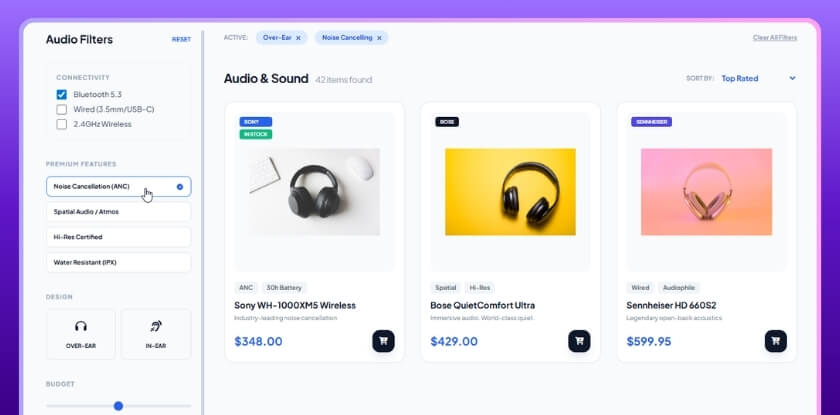
Dynamic AJAX Product Filters is particularly well suited to stores where shoppers refine products in several steps and benefit from clearer filtering feedback. Features like active selected-filter displays, AJAX pagination, AJAX sorting, reset controls, and mobile-specific filter modes help keep browsing efficient even when the filtering journey becomes more layered. That creates a smoother experience for users who compare more criteria before deciding.
Scalability as The Catalog Grows
Dynamic AJAX Product Filters is better suited to stores where filtering plays a larger role in navigation, especially as catalog size, shopper refinement behavior, and device mix become more demanding.
Theme, Builder, and Plugin Compatibility
Compatibility decides whether a filter plugin fits neatly into your existing WooCommerce setup or creates extra work during implementation. For most stores, that means more than theme support alone. It also includes builders, blocks, widgets, shortcodes, archive detection, and how well the plugin works with different product query setups.
Theme and Plugin Compatibility Comparison Table
| Compatibility Area | Clever WooCommerce Product Filter | Dynamic AJAX Product Filters |
| WooCommerce shop page support | Yes | Yes |
| Product category archive support | Yes | Yes |
| Product tag archive support | Supported | Yes |
| Product attribute archive support | Supported | Yes |
| Brand archive support | Available | Yes |
| Custom taxonomy archive support | Limited | Yes |
| Widget support | Yes | Yes |
| Shortcode support | Yes | Yes |
| Gutenberg / block editor support | Less clearly highlighted | Yes |
| Elementor support | Less clearly highlighted | Yes |
| Other builder compatibility | Not strongly detailed | Broad builder support |
| Flexible product-query detection | Less emphasized | Stronger |
What Compatibility Looks Like in Practice
Clever WooCommerce Product Filter should work well for stores using a more conventional WooCommerce layout, especially when filters are placed through standard widget or shortcode areas and the product structure follows a familiar pattern. That makes it easier to adopt on stores that are not heavily customized.
Dynamic AJAX Product Filters appears better suited to mixed build environments. It supports Elementor widgets, Gutenberg blocks, classic widgets, shortcodes, multiple archive types, and a wider range of builder and query integrations. That matters when stores use custom layouts, page builders, shortcode-based product loops, or more complex archive structures that need filters to behave consistently across different contexts.
Which Plugin Is Stronger on Compatibility?
Either plugin can work for a standard WooCommerce setup. Dynamic AJAX Product Filters is the more flexible option for stores using builders, custom archive structures, or varied product-grid layouts.
Support, Setup Help, and Documentation Quality
Support quality matters most when a store needs more than a default setup. A filter plugin may look fine on a feature list, but once styling changes, archive-specific logic, mobile behavior, or SEO settings come into play, documentation and troubleshooting guidance start to matter a lot more.
Support and Documentation Comparison Table
| Support Area | Clever WooCommerce Product Filter | Dynamic AJAX Product Filters |
| Public documentation depth | More limited | Broader and more structured |
| Setup guidance | Basic product-level guidance | Step-by-step setup help |
| Styling and display guidance | Less detailed publicly | More detailed guidance available |
| SEO-related documentation | Limited | Dedicated SEO and URL guidance |
| Advanced settings documentation | Less emphasized | Better covered |
| Troubleshooting confidence | More dependent on direct support | Stronger self-serve guidance |
What This Means for Store Owners and Developers
Clever WooCommerce Product Filter can still be workable for stores with a simple setup, especially when the filtering experience does not need much customization. But its publicly visible guidance appears more limited, which means merchants may depend more on direct support when they run into edge cases or want to fine-tune behavior.
Dynamic AJAX Product Filters has a stronger documentation position because it includes more structured guidance around setup, filter behavior, design controls, advanced settings, SEO handling, and wider compatibility contexts. That makes it easier for store owners, developers, and agencies to solve problems faster without relying entirely on one-to-one support.
Which Plugin Gives More Support and Confidence?
Documentation depth may not matter much on a simple store. For more customized builds, Dynamic AJAX Product Filters provides a more reliable support and documentation base for setup, troubleshooting, and ongoing adjustments
SEO, Speed, and Technical Flexibility
For many WooCommerce stores, the best filter plugin is not the one with the longest feature list. It is the one that balances three things well: how safely it handles filtered URLs, how smoothly it performs during shopper interactions, and how reliably it fits into the store’s existing theme and plugin stack.
Combined Comparison Table
| Strategic Area | Clever WooCommerce Product Filter | Dynamic AJAX Product Filters |
| Filter URL control | More limited | Stronger |
| SEO-friendly permalinks | Limited | Yes |
| Indexable filtered page control | Basic | More advanced |
| AJAX behavior during refinement | Good | Stronger |
| AJAX pagination and sorting | Less emphasized | Yes |
| Mobile filtering flexibility | Standard | More advanced |
| Builder and archive compatibility | Standard | Broader |
| Custom taxonomy compatibility | More limited | Stronger |
| Best fit | Standard WooCommerce stores | SEO-aware and growth-focused stores |
Why These Three Areas Should Be Judged Together
SEO, performance, and compatibility often affect each other. A plugin may filter products well on the front end, but still create problems if filtered URLs are hard to manage, if interactions slow down when multiple filters are applied, or if the plugin struggles across builders and archive types.
Clever WooCommerce Product Filter works best when the store uses a conventional WooCommerce setup and does not need a highly controlled faceted navigation strategy. In that kind of environment, it can improve browsing without asking the merchant to manage too many technical settings.
Dynamic AJAX Product Filters is stronger when these three areas all matter at once. It offers SEO-friendly permalink options, multiple URL modes, AJAX pagination and sorting, mobile-aware filter layouts, and wider support across archive contexts, builders, and custom taxonomies. That combination makes it more suitable for stores that want filtering to support both user experience and long-term technical stability.
Which Plugin Is the Better Strategic Choice?
If your store is relatively simple and your main goal is adding standard AJAX filters to a normal WooCommerce layout, Clever WooCommerce Product Filter can still be a workable option.
Which Plugin Fits Your Store Type Best?
The most useful way to choose between these plugins is to match them to the kind of store you run. A plugin that feels right for a smaller fashion catalog may not be the best fit for a large technical store with layered attributes, custom fields, and SEO-driven category pages.
Best-Fit Comparison by Store Type
| Store Type | Better Fit | Why |
| Small store with simple filters | Clever WooCommerce Product Filter | Easier for standard filtering needs |
| Fashion or lifestyle store | Clever WooCommerce Product Filter | Strong fit for common attribute-based browsing |
| Visual-first storefront | Clever WooCommerce Product Filter | Better aligned with visually familiar filter presentation |
| Medium store with growing filter needs | Depends, often Dynamic AJAX Product Filters | Better if filtering complexity is increasing |
| Large catalog store | Dynamic AJAX Product Filters | Better prepared for broader filter coverage and scaling |
| SEO-focused WooCommerce store | Dynamic AJAX Product Filters | Stronger URL and filtered-page control |
| Store using custom fields or taxonomies | Dynamic AJAX Product Filters | Better support for non-standard product data |
| Builder-heavy or custom-layout store | Dynamic AJAX Product Filters | Broader compatibility across layouts and archive contexts |
| Store expecting long-term catalog growth | Dynamic AJAX Product Filters | More flexible as filtering needs expand |
When Clever WooCommerce Product Filter Makes More Sense
Clever WooCommerce Product Filter is the better match when the catalog follows a standard WooCommerce structure and shoppers mainly refine products by familiar criteria such as size, color, price, rating, and stock. In those cases, the plugin can improve navigation without asking the store owner to manage a more advanced filtering system than the store really needs.
When Dynamic AJAX Product Filters Makes More Sense
Dynamic AJAX Product Filters is the better fit when product discovery depends on more data points, more archive contexts, or more precise control over how filters behave across the site. It is especially well suited to stores that need filtering to remain useful as the catalog becomes deeper, more segmented, and more SEO-sensitive over time.
Practical Takeaway
If your store only needs straightforward filtering for a conventional product catalog, Clever WooCommerce Product Filter can still be a sensible choice.
If your store needs filtering to do more heavy lifting for navigation, search refinement, and long-term growth, Dynamic AJAX Product Filters is the more future-ready option.
Pros and Cons of Each WooCommerce Filter Plugin
A side-by-side pros and cons view helps simplify the decision. Instead of repeating every feature, this section focuses on where each plugin feels most useful and where its limits become more noticeable in real WooCommerce use.
Clever WooCommerce Product Filter
Pros
- Good fit for standard WooCommerce filtering needs
- Supports AJAX-based product refinement
- Multi-select attributes help shoppers narrow results more easily
- Practical choice for stores using familiar filter conditions
- Easier to understand for merchants who want a simpler setup path
Cons
- No free version for testing before purchase
- Less flexible for custom-field or custom-taxonomy-heavy catalogs
- More limited control over filtered URL behavior
- Less suited to stores that need page-specific filter strategies
- May feel restrictive as catalog complexity grows
Dynamic AJAX Product Filters
Pros
- Supports a broader range of filter sources and store setups
- Better suited to complex, layered, or fast-growing catalogs
- Offers stronger control over filter URLs and SEO handling
- Includes AJAX pagination, AJAX sorting, and selected-filter displays
- Works across more archive types, builders, and placement methods
- Free version available, which lowers the entry barrier
Cons
- Broader controls can require more setup planning
- Some advanced features are tied to premium access
- May be more than a very simple store actually needs
Bottom Line from The Pros and Cons
Clever WooCommerce Product Filter is easier to justify when the store needs a clean, standard filtering setup and does not require much technical depth.
Dynamic AJAX Product Filters is easier to justify when flexibility, advanced catalog handling, and long-term filtering control matter more than keeping setup as basic as possible.
SEO Mistakes to Avoid When Using Product Filter Plugins
Filter plugins can improve product discovery, but they can also create search-performance problems when filtered pages are left unmanaged. Many stores focus only on the front-end experience and overlook how faceted navigation affects crawl paths, duplicate URLs, and index quality.
Here are some of the most common SEO mistakes:
- Letting too many filtered URLs get indexed
When every filter combination can create an indexable page, search engines may spend time on low-value URLs instead of core category and product pages. - Creating duplicate or near-duplicate filtered pages
Different filter combinations can often lead to nearly identical product results, which weakens the uniqueness of those pages. - Using parameter-heavy URLs without a clear strategy
Messy query strings can make filtered pages harder to manage, share, and optimize. - Ignoring canonical and indexation control
Filtered pages need clear signals so they do not compete with primary category pages or dilute ranking focus. - Allowing filters to generate crawl waste
Search engines can end up crawling thousands of combinations that add little organic value. - Treating every filtered state like an SEO landing page
Not every filter deserves to rank. Only selected, search-valuable combinations should be treated that way.
These issues matter in this comparison because URL handling and filtered-page control are not equally emphasized by both plugins. Stores with stronger SEO goals usually need a filtering system that helps manage faceted navigation more deliberately rather than simply displaying filtered results well on the front end. That is one of the reasons Dynamic AJAX Product Filters stands out more for SEO-aware WooCommerce stores.
Frequently Asked Questions
What is the main difference between Clever WooCommerce Product Filter and Dynamic AJAX Product Filters?
The main difference is filtering depth and long-term flexibility. Clever WooCommerce Product Filter is better suited to stores that want a straightforward filtering setup for standard WooCommerce needs. Dynamic AJAX Product Filters is better suited to stores that need broader filter coverage, stronger SEO-friendly URL control, smoother AJAX interactions, and more flexibility for layered or growing catalogs.
Which Plugin Is Better for Standard WooCommerce Stores?
Clever WooCommerce Product Filter is a good fit for standard WooCommerce stores where shoppers mainly filter by price, attributes, stock status, ratings, and sale items. It works well when the catalog structure is simple and the store does not need advanced filtering logic.
Which Plugin Is Better for Large or Complex Woo Commerce Catalogs?
Dynamic AJAX Product Filters is the better choice for large or complex WooCommerce catalogs. It supports more advanced filter sources such as tags, SKU, dimensions, discount, custom fields, and custom taxonomies, which makes it more suitable for stores with layered navigation needs.
Which Plugin Is Better for WooCommerce SEO?
Dynamic AJAX Product Filters is the stronger option for SEO-focused stores because it supports multiple URL modes, SEO-friendly permalinks, and better control over filtered-page behavior. That makes it a better fit for stores that want to manage faceted navigation more carefully.
Do Both Plugins Support AJAX Filtering?
Yes, both plugins support AJAX-based filtering, which helps shoppers update product listings without the friction of traditional full-page reloads. Dynamic AJAX Product Filters also includes AJAX pagination and AJAX sorting, which gives it a more complete AJAX filtering experience.
Is Dynamic AJAX Product Filters Better for Page Builders and Custom Store Layouts?
Yes. Dynamic AJAX Product Filters is the better fit for stores using builders or mixed layout environments because it supports widgets, shortcodes, Gutenberg blocks, Elementor, and broader archive and query integration. That makes it more flexible for custom WooCommerce builds.
Final Verdict: Which Plugin Should You Choose?
Both plugins improve WooCommerce filtering, but they are built for different levels of store complexity.
Clever WooCommerce Product Filter is a solid option for stores that want a straightforward filtering experience built around standard WooCommerce needs. It works best when the catalog mainly depends on familiar conditions like price, attributes, stock status, sale items, and ratings, and when the store owner prefers a simpler path to setup and management.
Dynamic AJAX Product Filters is the stronger overall choice for stores that need more than basic refinement. It supports a wider range of filter types, works across more archive and builder contexts, offers stronger control over URL behavior, and is better prepared for stores where filtering plays a central role in navigation, SEO, and catalog growth. Its broader configuration options feel most justified when the store expects product discovery to become more complex over time.
Clever WooCommerce Product Filter is a practical choice for stores with straightforward filtering needs. For stores that need deeper control, smoother filtering interactions, and more room to grow, Dynamic AJAX Product Filters is the better long-term option.