
Choosing the right WooCommerce filter plugin is not just a design decision. It directly affects how quickly shoppers can narrow down products, how easily they can browse large catalogs, and how smoothly the store performs during product discovery.
In this comparison of Themify Product Filter vs. Dynamic AJAX Product Filters for WooCommerce, the goal is to look beyond surface-level features and focus on practical store fit. Both plugins help shoppers refine product listings, but they are built with different priorities. Themify Product Filter is more appealing for stores that value visual layout control and builder-friendly filter placement, while Dynamic AJAX Product Filters is better suited to merchants who want faster AJAX-based filtering, broader filter depth, and more flexibility across different WooCommerce setups. Dynamic AJAX Product Filters also supports a wide range of filter types, including categories, attributes, tags, price, rating, stock, sale status, SKU, custom fields, and custom taxonomies, along with SEO-friendly URL options and compatibility across common builders and archive contexts.
This guide is designed to help store owners, developers, and theme users choose the plugin that best matches their catalog structure, storefront goals, and long-term filtering needs.
Who Should Choose Between Themify Product Filter and Dynamic AJAX Product Filters?
This comparison is for WooCommerce store owners, developers, and agencies who want to improve product discovery without choosing a filter plugin based only on appearance or a short feature list. It is especially relevant for stores where filtering now plays a bigger role in navigation, user experience, and conversion.
You will find this comparison useful if:
- your store has a growing catalog and shoppers need faster ways to narrow products
- you are comparing a design-oriented filter setup with a more performance-focused AJAX solution
- you want filtering to work smoothly across shop, category, tag, or custom archive pages
- you need a plugin that fits your current theme or page builder without adding friction
- you care about SEO implications such as filtered URLs, crawl behavior, and index control
- you are deciding between a layout-led filtering experience and a more utility-driven one
In practical terms, this comparison is most helpful for merchants trying to match the right plugin to the way their storefront is built. Stores that want the filter interface to feel tightly connected to page design may lean toward Themify Product Filter, while stores that need broader filtering logic, stronger AJAX behavior, and more flexible integration across themes may find Dynamic AJAX Product Filters more suitable.
Quick Verdict: Themify Product Filter or Dynamic AJAX Product Filters?
Both plugins improve WooCommerce product filtering, but they serve slightly different types of stores.
Themify Product Filter is the better fit for merchants who care a lot about how the filter form looks and fits into the page layout. It is more appealing for builder-oriented storefronts and for stores where filter presentation is closely tied to design.
Dynamic AJAX Product Filters for WooCommerce is the stronger option for stores that want filtering to be faster, broader, and easier to scale. It supports a much wider range of filter types, including categories, attributes, tags, price, rating, stock, sale status, SKU, dimensions, discount, custom fields, and custom taxonomies. It also offers AJAX filtering, AJAX pagination and sorting, SEO-friendly permalink modes, mobile filter layouts, active filter chips, and support across multiple builders and archive types.
Here is the short version:
- Choose Themify Product Filter if layout flexibility and builder-friendly design matter most.
- Choose Dynamic AJAX Product Filters if speed, deeper filtering logic, reload-free browsing, and theme-independent flexibility matter more.
For most stores with growing catalogs and more advanced filtering needs, Dynamic AJAX Product Filters has the broader practical advantage. For stores that are more design-led, especially those already comfortable with Themify-style workflows, Themify Product Filter can still be a sensible choice.
Core Feature Comparison: Themify Product Filter vs. Dynamic AJAX Product Filters
At a basic level, both plugins let shoppers refine WooCommerce product listings without forcing a full page refresh. The real difference is how far each plugin goes beyond that baseline. Themify Product Filter covers the standard filtering experience well, especially for stores that want a more layout-conscious interface. Dynamic AJAX Product Filters goes further with broader filter coverage, more control over how filters behave, and stronger support for SEO-friendly URL handling, mobile filtering, and archive-wide integration.
Core features comparison table
| Feature Area | Themify Product Filter | Dynamic AJAX Product Filters for WooCommerce |
| AJAX product filtering | Yes | Yes |
| AJAX pagination | Not clearly emphasized | Yes |
| AJAX sorting | Not clearly emphasized | Yes |
| Category filters | Yes | Yes |
| Attribute filters | Yes | Yes |
| Tag filters | Yes | Yes |
| Price filters | Yes | Yes |
| Search filters | Yes | Yes |
| Rating filters | Limited | Yes |
| Stock status filters | Limited | Yes |
| Sale filters | Limited | Yes |
| SKU filters | No | Yes |
| Custom field filters | Not clearly emphasized | Yes |
| Custom taxonomy filters | Yes | Yes |
| Active filter display | Basic | Yes |
| Multi-select and single-select behavior | Basic | Yes |
| AND / OR filter logic | More limited | Yes |
| SEO-friendly URL modes | Limited | Yes |
| Pretty permalinks | Limited | Yes |
| Mobile filter layouts | Theme dependent | Yes |
| Elementor / block / shortcode support | Yes | Yes, broader |
| Built-in filter UI variety | Good | Much broader |
What stands out on Themify Product Filter
Themify Product Filter is strongest when the merchant cares about filter presentation and builder-friendly layout control. Its drag-and-drop form-building approach, vertical and horizontal layout options, live AJAX search behavior, and compatibility with builders such as Themify Builder, Elementor, and Divi make it attractive for stores where the filter area is part of the page design rather than just a functional tool.
What stands out on Dynamic AJAX Product Filters
Dynamic AJAX Product Filters has a much broader core feature set. For stores evaluating a WooCommerce Ajax product filter, it supports filtering by categories, tags, attributes, price, rating, brand, stock, sale status, SKU, dimensions, discount, date, search, custom fields, and custom taxonomies. It also includes AJAX filtering, AJAX pagination, AJAX sorting, active filter chips, apply and reset controls, preselected filter defaults, multiple URL modes, mobile-specific filter styles, and compatibility across shop pages, category archives, tag archives, attribute archives, brand archives, custom taxonomy archives, and common builder-driven product grids.
Practical takeaway
If your store only needs a solid visual filter form with standard filtering options, Themify Product Filter may be enough. If your store needs filtering to handle more product signals, more archive contexts, and a smoother no-reload browsing flow, Dynamic AJAX Product Filters is clearly the more feature-complete option.
Pricing Comparison: Which WooCommerce Filter Plugin Offers Better Value?
Pricing matters most when two plugins seem similar at first glance. In this case, both plugins offer a free entry point and a paid upgrade path, but the value feels different depending on what your store actually needs. Themify Product Filter can make sense for stores that mainly want builder-friendly filtering with a design-led setup. Dynamic AJAX Product Filters tends to offer stronger value for stores that expect filtering to play a larger role in navigation, catalog discovery, and long-term growth.
Pricing comparison table
| Pricing Area | Themify Product Filter | Dynamic AJAX Product Filters for WooCommerce |
| Free version available | Yes | Yes |
| Core filtering in free version | Yes | Yes |
| Breadth of features in free version | Medium | Higher |
| Premium version available | Yes | Yes |
| Better value for simple stores | Good | Good |
| Better value for growing catalogs | Moderate | Strong |
| Better value for advanced filtering needs | Limited | Stronger |
How to think about cost properly
The real cost of a filter plugin is not just the license price. It is also the tradeoff between what the plugin can do today and how well it can keep supporting your store later.
Themify Product Filter may feel like better value if:
- your filtering needs are fairly standard
- your store is already built around Themify or a builder-first workflow
- layout control matters more than advanced filtering depth
Dynamic AJAX Product Filters usually gives better long-term value if:
- your catalog is growing
- you need more filter types beyond the basics
- you want AJAX pagination and sorting as part of the filtering experience
- you care about SEO-friendly URL structure and broader archive support
- you want one plugin that can support more complex filter logic without outgrowing it too quickly
Practical takeaway
For smaller stores with simple needs, pricing may not be the biggest differentiator. But for stores that expect product filtering to become more central to usability and conversion, Dynamic AJAX Product Filters looks like the stronger value investment because it packs more filtering depth into the overall solution.
How Each Plugin Fits Different Store Setups
A feature table helps, but it does not always show which plugin will actually feel more natural in a real WooCommerce store. That depends on how the storefront is built, how important filter layout is, how many product signals shoppers need to combine, and whether the store expects filtering to stay simple or grow more advanced over time. This is where the difference between these two plugins becomes clearer.
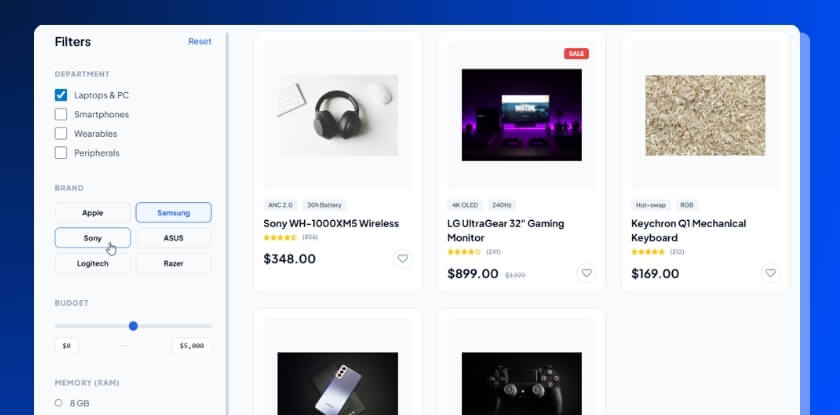
Dynamic AJAX Product Filters for WooCommerce
Dynamic AJAX Product Filters fits stores that want filtering to be a core part of product discovery, not just a visual add-on. It works especially well when shoppers need to refine products by multiple criteria and expect fast, reload-free updates while browsing. Its broader filter support includes categories, attributes, tags, price, rating, brands, stock, sale status, SKU, discount, dimensions, date, custom fields, and custom taxonomies. It also supports AJAX pagination, AJAX sorting, selected-filter chips, multiple URL modes, mobile filter layouts, and integration across common builders, product grids, and archive types.
Best fit for:
- stores with medium to large product catalogs
- WooCommerce sites using different themes or custom layouts
- shops that need more than just basic category and price filters
- merchants who want broader filter logic and smoother AJAX behavior
- stores that care about SEO-friendly filter URLs and long-term scalability
Possible limitation to keep in mind:
- it is more utility-focused than design-focused, so some styling refinement may still be needed depending on the theme
Themify Product Filter
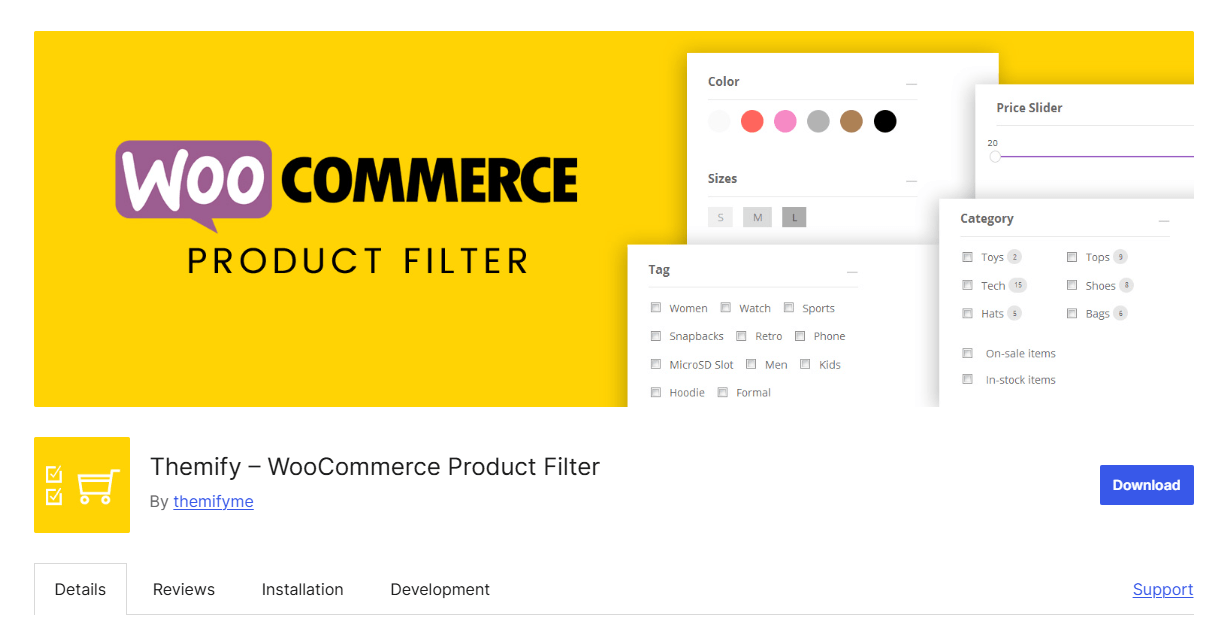
Themify Product Filter fits best in stores where the filter interface is closely tied to the visual structure of the page. Its builder-friendly character makes it more appealing for merchants who want to shape the filter form as part of the storefront layout, not just drop in a standard sidebar tool. It supports live AJAX filtering, multiple filter combinations, drag-and-drop form building, vertical and horizontal layouts, search support, and compatibility with Themify Builder, Elementor, and Divi.
Best fit for:
- Themify users or builder-oriented store owners
- stores where filter presentation matters a lot
- smaller or moderately complex catalogs
- merchants who want stronger control over filter form layout
Possible limitation to keep in mind:
- it looks less suited to stores that need deeper filtering logic across many product signals
Practical takeaway
Choose based on how filtering functions in your store. If filtering is mainly part of page presentation, Themify Product Filter can be a good fit. If filtering is a major part of how shoppers discover products and move through a growing catalog, Dynamic AJAX Product Filters for WooCommerce is the stronger match.
Filtering Options Compared: Themify Product Filter vs. Dynamic AJAX Product Filters
Filtering range matters because two plugins can both support AJAX filtering while offering very different depth once shoppers start narrowing products by more specific product data.
| Filter Type | Themify Product Filter | Dynamic AJAX Product Filters for WooCommerce |
| Categories | Yes | Yes |
| Attributes | Yes | Yes |
| Tags | Yes | Yes |
| Price | Yes | Yes |
| Search | Yes | Yes |
| Rating | Limited | Yes |
| Stock status | Limited | Yes |
| Sale status | Limited | Yes |
| SKU | No | Yes |
| Brand | Not clearly emphasized | Yes |
| Custom fields | Not clearly emphasized | Yes |
| Custom taxonomies | Yes | Yes |
| Date | Not clearly emphasized | Yes |
| Dimensions | No | Yes |
| Discount | No | Yes |
For stores with basic WooCommerce filtering needs, Themify Product Filter covers the common essentials. For stores that need more detailed product discovery, Dynamic AJAX Product Filters supports a wider filtering range and is better prepared for catalogs with richer product data
Performance and User Experience: Which Plugin Delivers Smoother Product Filtering?
Performance is not only about how fast a filter updates. It is also about how smooth the browsing flow feels, how easily shoppers can narrow products without friction, and whether the plugin still feels manageable as the catalog grows.
Performance and UX comparison table
| Comparison Area | Themify Product Filter | Dynamic AJAX Product Filters for WooCommerce |
| Product updates without reload | Yes | Yes |
| Browsing flow | Good for design-led stores | Faster and more utility-driven |
| AJAX pagination and sorting | Not clearly emphasized | Yes |
| Handling larger catalogs | Moderate | Stronger |
| Admin manageability over time | Good for simpler setups | Better for more advanced setups |
| Mobile filtering experience | Good, but more theme-dependent | Stronger mobile-focused options |
| Scalability as filtering needs grow | More limited | Stronger |
Themify Product Filter: performance profile
Themify Product Filter works well for stores with straightforward filtering needs and a stronger focus on how the filter area fits into the storefront design. Its AJAX behavior helps avoid full page reloads, which improves product discovery compared with traditional filtering. But based on the available comparison points, it feels more comfortable in simpler or moderately layered catalogs than in stores where filtering becomes more complex over time.
Dynamic AJAX Product Filters: performance profile
Dynamic AJAX Product Filters is built more explicitly around filtering speed and catalog handling. It supports AJAX filtering, AJAX pagination, AJAX sorting, cached filter data, AJAX fragment optimization, cache clearing on product changes, smart auto scroll, filtering overlays, mobile-specific filter modes, and responsive layouts. These details make it more convincing for stores that want filtering to stay smooth as product data, archive types, and shopper filtering behavior become more demanding.
User experience differences that matter
From a shopper’s perspective, the biggest difference is how central filtering feels to the buying journey.
- Themify Product Filter feels more presentation-aware. It fits stores where filtering supports the page layout and visual flow.
- Dynamic AJAX Product Filters feels more action-oriented. It is better for stores where shoppers are expected to combine multiple filters quickly and move through product listings with minimal interruption.
Practical takeaway
If your store has a smaller catalog or puts more emphasis on layout and page presentation, Themify Product Filter can be enough. If your store expects filtering to support larger inventories, deeper product data, and faster shopper decisions, Dynamic AJAX Product Filters has the stronger performance and scalability profile.
Theme, Builder, and WooCommerce Compatibility Comparison
Compatibility matters after installation, not before. A filter plugin may look strong on its own, but the real test is whether it fits smoothly with your active theme, your page builder, your product archive layout, and the rest of your WooCommerce stack.
Compatibility comparison table
| Compatibility Area | Themify Product Filter | Dynamic AJAX Product Filters for WooCommerce |
| WooCommerce theme support | Yes | Yes |
| Best fit with Themify ecosystem | Strong | Not theme-specific |
| Custom theme flexibility | Moderate | Stronger |
| Elementor compatibility | Yes | Yes |
| Divi compatibility | Yes | Yes |
| Gutenberg / blocks support | Not clearly emphasized | Yes |
| Shortcode support | Yes | Yes |
| Widget support | Yes | Yes |
| Archive page coverage | Good | Broader |
| Custom taxonomy archive support | Yes | Yes |
| Product grid / builder integration | Good | Broader |
Where Themify Product Filter fits best
Themify Product Filter is naturally appealing for stores already working inside a Themify-oriented setup or a builder-led storefront. It supports widget and shortcode placement and is described as compatible with Themify Builder, Elementor, and Divi. That makes it a reasonable choice for merchants who want filtering to feel closely connected to visual page construction.
Where Dynamic AJAX Product Filters fits better
Dynamic AJAX Product Filters is more flexible across mixed WooCommerce environments. It supports Elementor widgets, Gutenberg blocks, classic widgets, and shortcodes, and it works across shop pages, product category archives, tag archives, attribute archives, brand archives, custom taxonomy archives, and several builder or product-grid setups. The plugin information also points to compatibility with builders such as Elementor, WPBakery, Divi, Beaver Builder, Oxygen, Bricks, JetEngine Listing Grid, Woo Product Grid, and WooCommerce shortcode-based product loops.

Practical takeaway
If your store is closely tied to Themify or a layout-driven builder workflow, Themify Product Filter has a natural compatibility advantage. If you want a filtering plugin that can move more comfortably across different themes, builders, archive contexts, and custom WooCommerce setups, Dynamic AJAX Product Filters is the safer long-term choice.
Support and Documentation: Which Plugin Is Easier to Work With Over Time?
Support quality becomes more important once a filter plugin becomes part of the store’s daily workflow. Setup questions, styling tweaks, builder conflicts, archive behavior, and filter logic issues are much easier to manage when the documentation is clear and the support path is reliable.
Support and documentation comparison table
| Support Area | Themify Product Filter | Dynamic AJAX Product Filters for WooCommerce |
| Documentation quality | Good | Clear and more structured |
| Setup guidance | Good for standard use | Strong for broader use cases |
| Technical guidance | Moderate | Stronger |
| Learning resources | Good | Good |
| Support responsiveness | Varies | Higher |
| Confidence for advanced setups | Moderate | Stronger |
Themify Product Filter support profile
Themify Product Filter appears suitable for merchants who need help with standard setup and day-to-day filter usage. For stores with simpler layouts and less complex filtering requirements, that may be enough. The documentation looks useful, but it appears less positioned around advanced filtering depth, broader archive behavior, or more technical SEO-oriented use cases.
Dynamic AJAX Product Filters support profile
Dynamic AJAX Product Filters looks stronger for stores that need clearer technical direction. Its feature set is broader, and the support comparison suggests more structured documentation and stronger help for advanced use cases. That matters more when merchants are working with custom fields, custom taxonomies, multiple builders, archive-specific filtering, or SEO-friendly permalink setups.
Practical takeaway
If your store setup is simple and mostly design-led, Themify Product Filter support may be enough. If your store relies on deeper filtering behavior or more varied WooCommerce contexts, Dynamic AJAX Product Filters offers stronger support, confidence, and clearer documentation value.
SEO and Filter URL Management
SEO is one of the easiest areas to overlook when choosing a WooCommerce filter plugin. Filtered URLs, crawl behavior, and index control can all affect the long-term health of faceted navigation.
SEO comparison table
| SEO Area | Themify Product Filter | Dynamic AJAX Product Filters for WooCommerce |
| Clean filter URLs | Limited | Yes |
| Query-string URL support | Basic | Yes |
| SEO-friendly pretty permalinks | Limited | Yes |
| Index / noindex control | Basic | Stronger |
| Duplicate URL risk management | Moderate | Stronger |
| Faceted search safety | More limited | Better prepared |
| Custom URL prefixes | Not clearly emphasized | Yes |
| Dynamic SEO meta support | Not clearly emphasized | Yes |
Where Themify Product Filter stands
Themify Product Filter appears more storefront-focused than SEO-focused. It can still work for stores that do not plan to rely heavily on indexable filtered pages, but its public comparison profile places less emphasis on structured URL handling, clean permalinks, and deeper faceted-search management. That means store owners may need to be more careful about how filtered states are exposed and whether they are worth letting search engines crawl.
Where Dynamic AJAX Product Filters stands out
Dynamic AJAX Product Filters is much more clearly built with filter URL management in mind. It supports multiple URL modes, including AJAX-only behavior, query-string URLs, and SEO-friendly pretty permalinks. It also includes customizable permalink structures, custom URL prefixes for filter types, front-page permalink support, anchor-style filter links, and dynamic SEO meta output based on active filter values. Those details make it a stronger fit for stores that want product filtering without creating unnecessary SEO mess.
Common SEO risks with product filter plugins
No matter which plugin you use, these are the main SEO issues to watch:
- duplicate filtered URLs that lead to near-identical product listings
- thin filtered pages with very little unique search value
- index bloat from too many crawlable filter combinations
- crawl waste on low-priority filtered states
- internal link dilution across pages that should not rank
- category page competition caused by uncontrolled faceted navigation
Practical takeaway
If SEO is not a major concern and your store mainly needs visually integrated filtering, Themify Product Filter may still be enough. But if you care about cleaner URL behavior, more controlled faceted navigation, and better long-term SEO handling, Dynamic AJAX Product Filters is the more convincing option.
Which Plugin Fits Which Type of Store?
The easiest way to choose between these plugins is to look at the kind of store you are running. Both can improve WooCommerce filtering, but they make more sense in different environments. Themify Product Filter is stronger when layout and builder-based presentation matter more. Dynamic AJAX Product Filters is stronger when filtering needs to support larger catalogs, more filter logic, and a faster product discovery workflow.
Best-fit comparison table
| Store Type | Better Fit | Why |
| Small design-led WooCommerce store | Themify Product Filter | Better aligned with layout-focused storefronts |
| Themify theme or builder-oriented store | Themify Product Filter | More natural fit for design-shaped page setups |
| Medium catalog with standard filters | Depends | Choice depends on design priority vs filtering depth |
| Large catalog with layered filtering needs | Dynamic AJAX Product Filters | Better range and scalability |
| SEO-focused store | Dynamic AJAX Product Filters | Stronger URL and filter-state handling |
| Theme-independent WooCommerce store | Dynamic AJAX Product Filters | Broader compatibility across setups |
| Store needing advanced product signals like SKU, stock, sale, or custom fields | Dynamic AJAX Product Filters | Much deeper filter coverage |
| Store prioritizing smooth no-reload browsing | Dynamic AJAX Product Filters | Stronger AJAX-first experience |
Choose Themify Product Filter if
- your store is more design-led than filter-heavy
- you want stronger control over how the filter area looks on the page
- you already use Themify or a builder-based layout workflow
- your filtering needs are mostly standard and not deeply layered
Choose Dynamic AJAX Product Filters if
- your shoppers need to combine multiple filters quickly
- your store has a medium or large catalog
- you want more than basic category, attribute, and price filtering
- you care about theme flexibility, SEO-friendly URL behavior, and long-term scalability
- you want filtering to feel like a core part of product discovery, not just a page element
Practical takeaway
Themify Product Filter suits stores where filtering supports the design. Dynamic AJAX Product Filters suits stores where filtering supports the shopping journey more directly. For most growing WooCommerce stores, especially those that need speed, deeper filtering, and broader compatibility, Dynamic AJAX Product Filters is the better long-term fit.
Final Verdict
Themify Product Filter and Dynamic AJAX Product Filters for WooCommerce are not trying to win in exactly the same way. Both improve product discovery, but they serve different priorities.
Themify Product Filter is the better fit for stores that care more about visual layout, builder-friendly presentation, and keeping the filter form closely aligned with the page design. For smaller stores or design-led WooCommerce setups, that can be enough.
Dynamic AJAX Product Filters for WooCommerce is the stronger choice for stores that need filtering to do more. It offers broader filter coverage, stronger AJAX behavior, better support for larger catalogs, more flexibility across themes and builders, and more structured handling of SEO-friendly filtered URLs. Its support for filter types like stock, rating, sale status, SKU, discount, dimensions, custom fields, and custom taxonomies makes it more practical for stores where product discovery needs to be faster, deeper, and easier to scale.
The conclusion is straightforward: if your main goal is layout-conscious filtering inside a design-led storefront, Themify Product Filter remains a valid option. But if your priority is speed, seamless no-reload AJAX filtering, broader filtering logic, and flexibility across any WooCommerce theme, then Dynamic AJAX Product Filters for WooCommerce is the better overall choice.