
Customers love options, but they also love control. In modern online stores, shoppers often want to select more than one filter at a time, like choosing both Red and Blue, or Nike and Adidas. That’s where the WooCommerce product filter multiple select feature comes in.
In this complete guide, we’ll explore what multiple-select filtering means, why it improves user experience, and how to implement it using both plugin and custom code methods.
What “Multiple Select” Means in Product Filters?
A multiple-select product filter allows users to choose multiple options within a single filter group—like selecting multiple colors, brands, or sizes at once. Unlike single-select filters (where selecting one option replaces the previous), multiple select filters combine results dynamically.
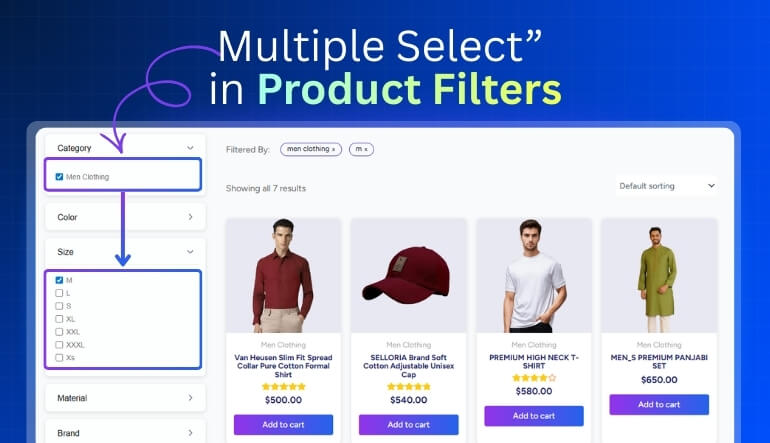
Single-Select vs Multiple-Select Logic
- Single-Select: Choosing “Red” hides all other colors.
- Multiple-Select: Selecting “Red” and “Blue” shows products from both colors simultaneously.
This flexibility helps customers browse more freely and find relevant products faster, reducing bounce rates and boosting conversions.
Why Multiple Select Matters for User Experience?
Today’s customers expect flexible filters similar to what they see on Amazon or Zalando. Multiple select options allow them to mix attributes without resetting previous selections, creating a smoother, frustration-free experience.
Core Benefits of Multiple-Select Product Filtering
Better Product Discovery & Engagement
When users can combine options freely, they explore more. A store selling shoes, for instance, benefits when users can check Nike, Adidas, and Puma all at once—showing more choices and encouraging longer sessions.
Common Mistakes When Permitting Multiple Selections
- Reload-based filtering: Forcing page reloads after every click slows down UX.
- Poor logic configuration: Mixing AND/OR incorrectly can hide valid results.
- Unclear visual feedback: Customers should instantly see what’s selected.
The key is to make the multi-select process fast, intuitive, and visually clear.
How to Set Up Multiple-Select Filters in WooCommerce (No Code)

Choosing a Plugin That Supports Multiple Select
You don’t need coding skills to enable multi-select filters. The best WooCommerce multiple select filter plugins include:
- Dynamic AJAX Product Filters (Plugincy): Supports multi-select checkboxes, dropdowns, and AND/OR logic.
- WOOF Product Filter: Allows unlimited selections across multiple taxonomies.
- Barn2 Product Filters: Provides customizable filter blocks with advanced logic support.
These plugins let you combine multiple filters (like brand + color + price) without slowing down your site.
Configuring Filter Options: Checkboxes, Multi-Dropdowns, AND/OR Logic
Once your plugin is installed:
- Go to Product Filters → Form Manage.
- Enable the filter types you want (category, attribute, brand, tags, etc.).
- Go to Product Filters → Form Style and pick the UI (checkboxes, dropdowns, swatches).
- Save and preview.
- Turn on multi-select and choose AND/OR logic if available.
- Save and preview.
Placing the Filter on Shop & Category Pages
Most plugins let you display filters using a widget, shortcode, or block.
Common placements:
- Sidebar on desktop.
- Collapsible or floating panel on mobile.
- Top filter bar under the page title.
Always keep filters within thumb reach for mobile users.
Advanced Setup: Custom Logic, Coding & AJAX for Multiple Select Filters
Using WP_Query or Tax Queries for Multi-Select Logic
If you prefer a custom solution, WooCommerce supports multi-select logic via tax_query.
Here’s an example of showing products with multiple brands selected:
$args = array(
‘post_type’ => ‘product’,
‘tax_query’ => array(
‘relation’ => ‘OR’,
array(
‘taxonomy’ => ‘product_brand’,
‘field’ => ‘slug’,
‘terms’ => array(‘nike’, ‘adidas’, ‘puma’),
),
),
);
$query = new WP_Query($args);
This displays all products from Nike, Adidas, or Puma.
Switch the relation to AND for stricter filtering.
Enabling AJAX to Improve Multi-Select Filter Performance
AJAX helps filters update instantly without reloading the page.
Benefits include:
- Seamless browsing and faster filtering.
- Lower server load compared to full page refreshes.
- Enhanced mobile experience with real-time updates.
Plugins like Dynamic AJAX Product Filters for WooCommerce already include built-in AJAX support, no extra coding required.
Handling Large Catalogues with Multiple Filter Combinations
When your store has thousands of products:
- Enable caching for frequent filter combinations.
- Limit visible filter terms (e.g., show top 10 brands).
- Use lazy loading for results below the fold.
- Optimize database indexes for faster taxonomy queries.
This ensures smooth performance even under heavy filtering loads.
Technical & SEO Considerations for Multi-Select Filters
Clean Parameter URLs and Canonical Tags for Multi-Select
Each filter combination generates a dynamic URL, such as:
/shop/?filter_brand=nike,adidas&filter_color=blue,red
SEO tips:
- Use canonical URLs to avoid duplicate content.
- Add noindex, follow to query URLs.
- Use meaningful slugs and parameters (avoid random IDs).
Tracking Multi-Select Filter Behaviour & Conversions
Use Google Analytics or GA4 to track:
- Which filters are used most often.
- Drop-off points after multi-filter selections.
- Conversions per filtered session.
Tracking reveals which combinations drive the highest engagement.
Mobile Design & Accessibility for Multi-Select Filters
Ensure filters are finger-friendly and easy to understand:
- Use checkboxes instead of toggles.
- Add a “Clear All” button.
- Ensure color contrast and touch spacing.
Accessibility improves both UX and SEO performance signals.
Real-Life Examples & Case Studies of Multi-Select Filtering
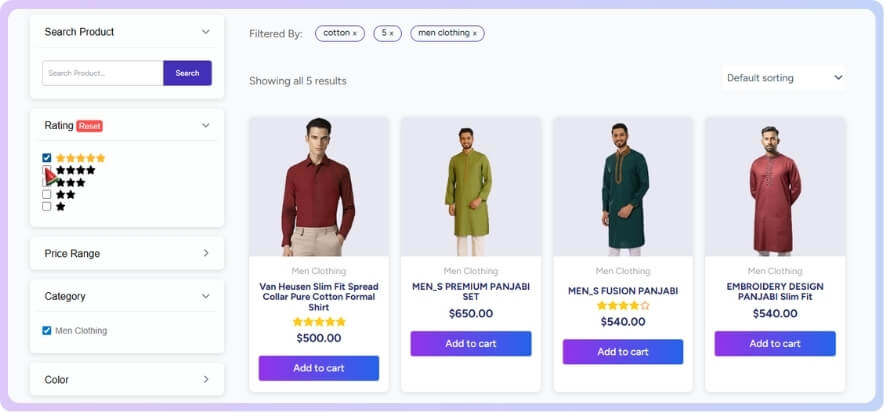
Retail Example: Clothing Store with “Color + Size” Multi-Select
A fashion brand enabled multi-select filtering for Color and Size.
Results:
- 26% longer browsing time.
- 15% increase in product views per session.
- Reduced bounce rate by 9%.
Electronics Example: “Brand + Feature” Multi-Select Setup
An electronics retailer allowed users to filter Samsung OR LG and 4K OR OLED.
Results:
- Faster product discovery.
- 22% higher add-to-cart rate.
- Greater satisfaction is reported in post-purchase surveys.
Troubleshooting Multi-Select Filter Issues
Multi-Select Options Not Working or Resetting
- Check plugin settings for AJAX refresh mode.
- Clear caching plugins that override query parameters.
- Rebuild your filter index if supported.
Performance Slow-Down When Many Options Selected
- Reduce the number of visible filter terms.
- Enable asynchronous (AJAX) requests.
- Optimize database queries with indexes.
Plugin Conflicts and Theme Compatibility
If filters malfunction:
- Switch temporarily to the Storefront theme.
- Disable minification and JS optimizers.
- Update WooCommerce and plugin to the latest version.
Summary & Best Practice Checklist
✅ Choose a plugin supporting multi-select and AJAX.
✅ Use checkboxes or dropdowns for clarity.
✅ Test AND/OR logic for relevance.
✅ Optimize URLs and add canonical tags.
✅ Track filter usage in Analytics.
✅ Ensure responsive design and caching for speed.
Done right, your filter products multiple select WooCommerce setup transforms browsing into a personalized shopping experience that increases engagement and sales.
Transform Your Store with Multi-Select Filters
Ready to level up your store’s product discovery? Add a WooCommerce multiple select filter plugin like Dynamic AJAX Product Filters today. Give shoppers the freedom to select, mix, and explore all without slowing your store down.
Frequently Asked Questions (FAQs)
Multi-select filters can feel confusing at first, especially when you want customers to pick more than one option at a time. These FAQs answer the most common setup questions and quick fixes so your filters work smoothly.
What Does Multiple-Select Mean in WooCommerce Filters?
Multiple-select filters let customers choose several options in the same category—for example, selecting both “Red” and “Blue.” It improves flexibility and user experience by showing all matching products at once.
How Can I Enable Multiple-Select Filters in WooCommerce?
You can enable multiple-select filters using plugins like Dynamic AJAX Product Filters, WOOF Product Filter, or Barn2 Product Filters, which support multiple checkbox or dropdown selections.
Why Should I Use Multiple-Select Filtering on My Store?
It gives shoppers more control over their search. Instead of choosing one option at a time, users can combine filters like brand, color, or price range to find exactly what they want.
Which Plugin Supports Multi-Select Filters With Ajax?
Dynamic AJAX Product Filters (Plugincy) and Barn2 Product Filters are great options. They support real-time updates, ensuring smooth product filtering without page reloads.
Does Using Multiple-Select Filters Affect SEO?
No, as long as you manage URLs correctly. Use canonical tags and noindex rules for filter-generated URLs to prevent duplicate content while maintaining crawl efficiency.
Can I Combine Multiple Filter Types Like Brand, Price, and Size?
Yes. Most advanced WooCommerce multiple select filter plugins allow you to combine filters across categories, attributes, and brands using AND/OR logic for better accuracy.
How Do I Improve Performance With Multiple-Select Filters?
Use AJAX for real-time updates, enable caching, and limit visible filter options. Optimizing database queries keeps filtering fast, even for stores with large product catalogs.
Are Multi-Select Filters Mobile-Friendly?
Yes, modern plugins offer responsive designs. Use collapsible filter drawers or floating side panels to make multi-select filters easy to use on small screens.
Why Are My Multiple-Select Filters Not Working?
Check your plugin settings to ensure multi-select mode is enabled. Also, clear your cache and test with a default theme to rule out compatibility issues.
Do I Need Coding Knowledge to Add Multi-Select Filters?
No. Most WooCommerce plugins provide visual options and shortcodes that let you create multiple filter selection WooCommerce interfaces without any custom code.